
A canonical URL is the preferred web address that you want search engines to treat as the main version of a page when multiple URLs contain the same or substantially similar content. A canonical link helps search engines understand which URL represents the primary version without requiring you to remove every duplicate or alternative URL.
Canonicalization is a technical SEO process that matters on eCommerce sites, large websites, migrations, syndicated content, and pages with parameters. If your website generates multiple URLs for one resource, a correct canonical setup can clarify indexing preferences and consolidate relevant signals.
What Is a Canonical URL?
A canonical URL is the URL that represents the preferred version of a webpage for search engines. You specify the preferred address with a rel=”canonical” link element inside the page’s HTML head.
For example, suppose a product page is available at:
https://example.com/product/shoes
The same page may appear through a filtered URL such as:
https://example.com/product/shoes?color=black
The second URL may exist for functionality, but the first URL can remain the preferred canonical address when the filtered version does not represent a distinct search-focused page.
A canonical URL does not automatically redirect visitors. Users can continue accessing an alternative URL unless another technical mechanism changes the request. The canonical signal tells search engines which URL you prefer for indexing and consolidation.
Why Do Canonical URLs Matter for SEO?
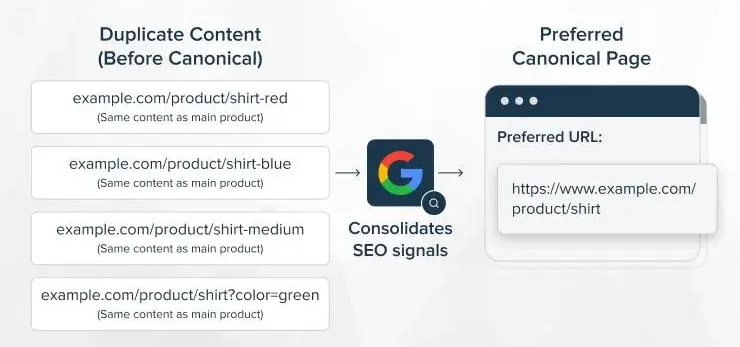
Canonical URLs help search engines identify the preferred version of duplicate or near-duplicate pages and consolidate signals toward that version. Canonicalization can reduce ambiguity when several URLs expose substantially similar content.
Search engines discover URLs independently, so one webpage can accumulate multiple addresses through parameters, filters, tracking codes, alternate paths, or content syndication. Without clear canonical signals, search engines must determine which URL represents the preferred version.
A canonical link can support three important SEO objectives:
- Clarify your preferred indexable URL.
- Consolidate signals associated with duplicate or similar URLs.
- Help search engines prioritize the intended page during crawling and indexing.
Canonicalization does not guarantee that Google will select the declared URL. Search engines can choose a different canonical when signals conflict or when another URL appears more appropriate.
When Should You Use a Canonical URL?
Use a canonical URL when multiple URLs represent the same or substantially similar content and you want one URL treated as the primary version. Common situations include parameters, duplicate paths, syndicated content, and alternate URL variations.
URL Parameters
ECommerce websites frequently create parameterized URLs for sorting, filtering, tracking, and session functions. Examples include:
https://example.com/shoes?color=black
When parameter URLs do not represent unique search-focused content, the clean category or product URL can serve as the canonical.
Do not canonicalize every parameter page automatically. A filter that creates genuinely valuable, unique content can require its own indexable URL and content strategy.
Duplicate or Near-Duplicate Pages
Canonicalization can help when two URLs display substantially similar information. Duplicate paths can occur because of CMS configurations, legacy URLs, URL variations, or technical changes.
For example, a website might expose both:
https://example.com/services/seo
and
https://example.com/seo-services
If both pages contain substantially similar content, select the URL that should represent the primary resource and canonicalize the duplicate when appropriate.
A canonical tag is not a substitute for removing unnecessary duplicate pages. If an alternative URL should never exist publicly, a redirect or other structural solution may be more appropriate.
Syndicated Content
Use a canonical link on republished content when the original publisher wants search engines to recognize another URL as the primary source. This situation commonly occurs when the same article appears on multiple platforms.
For example, you publish an article on your website and later republish the same article on a third-party publishing platform. The republished version can specify your original article as the canonical URL.
This approach can communicate the relationship between the copies, although search engines ultimately decide which URL to treat as canonical.
HTTP, HTTPS, and Other URL Variations
Your preferred canonical URL should normally use the final HTTPS version of the page. Websites commonly redirect HTTP requests to HTTPS, while internal links, sitemaps, and canonical tags should consistently use the preferred protocol.
A canonical tag can reinforce URL consistency, but a sitewide protocol migration requires redirects and consistent internal signals. Canonicalization should not replace a necessary 301 redirect from an obsolete HTTP URL to the HTTPS equivalent.
Site Migrations
During a site migration, canonical URLs should point to the corresponding preferred URLs on the new site. When an old page moves from /old-service to /new-service, the old URL should normally redirect to the new URL, while the new page should contain a self-referencing canonical.
A migration can involve hundreds or thousands of URL changes, so canonical tags must match the final URL mapping. Incorrect canonicals can conflict with redirects, internal links, XML sitemaps, and other migration signals.
How Does a Canonical Link Work?
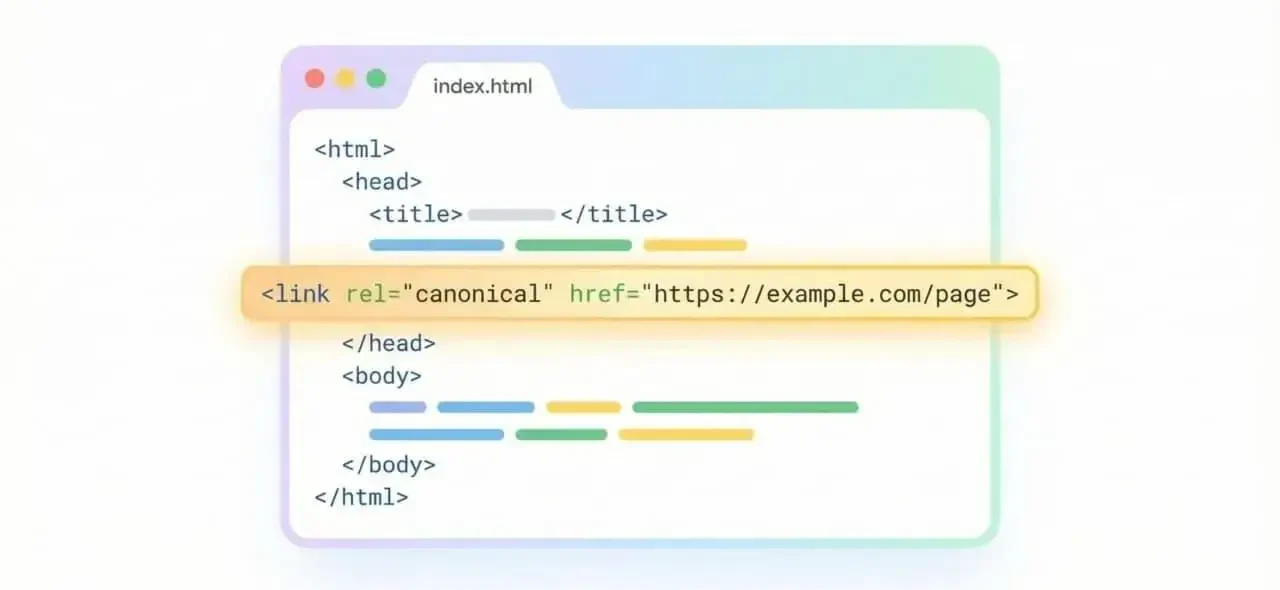
A canonical link works through a rel=”canonical” element placed in the HTML head of the page. The href attribute contains the preferred URL.
<link rel=”canonical” href=”https://example.com/preferred-page/” />
When search engines crawl the page, the canonical element communicates your preferred URL. Search engines evaluate the canonical alongside other signals such as redirects, internal links, sitemap URLs, HTTPS configuration, and page content.
The canonical should point to a valid, indexable destination. Avoid canonicalizing a page to a URL that redirects, returns an error, remains blocked from crawling, or contains materially different content.
Canonical URL vs 301 Redirect
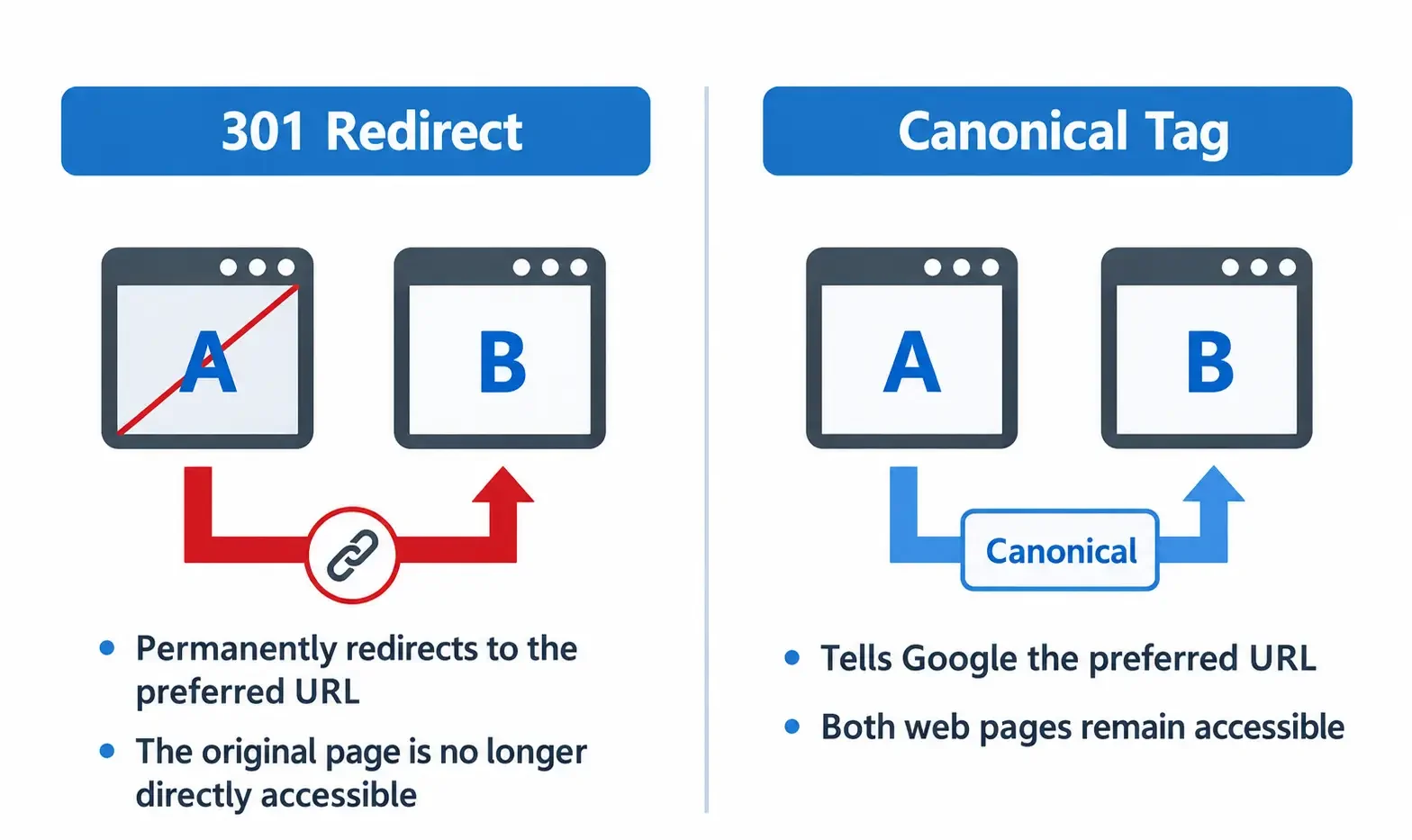
A canonical tag and a 301 redirect serve different purposes. A canonical communicates a preferred URL to search engines while allowing the alternative URL to remain accessible; a 301 redirect sends users and crawlers from one URL to another.
Use a 301 redirect when the old URL should permanently resolve to a new destination. Use canonicalization when multiple accessible URLs have a legitimate reason to exist but one URL should represent the primary version.
During migrations, use redirects for changed URLs and canonical tags on destination pages. Do not use canonical tags as a replacement for migration redirects.
Canonical URL vs Noindex
Canonical and noindex are different indexing directives with different purposes. A canonical identifies a preferred version among similar URLs, while noindex requests that a page not appear in search results.
A parameter page can point to a category URL through canonicalization when the parameter page is a duplicate or near duplicate. A private, internal, or otherwise unsuitable page may require noindex instead.
Do not combine noindex and canonical signals without a specific technical reason. A canonical target should normally remain eligible for indexing so search engines can select and consolidate signals appropriately.
How to Add a Canonical URL to a Webpage
Add a canonical link element inside the HTML head and set the href attribute to the preferred absolute URL. An implementation looks like this:
<link rel=”canonical” href=”https://example.com/page/” />
For a custom-coded website, a developer can place the element within the document head. Content management systems can generate canonical tags automatically, while SEO plugins can provide controls for individual pages.
On WordPress, verify the canonical generated by the SEO plugin instead of adding multiple competing tags manually. Rank Math and Yoast SEO can generate canonical URLs based on site and page settings.
On a syndicated article, place the original source URL in the canonical field provided by the publishing platform when that platform supports canonical configuration.
Canonicalization Mistakes to Avoid
Most canonical problems come from conflicting or incorrect URL signals. Check these 7 common errors:
- Canonicalizing a page to a URL that returns a 404 status.
- Canonicalizing to a redirected URL instead of the final destination.
- Using HTTP as canonical when HTTPS is the preferred version.
- Pointing unrelated pages to one canonical URL.
- Creating multiple canonical tags with conflicting destinations.
- Canonicalizing valuable unique pages because the URLs contain parameters.
- Using inconsistent trailing-slash or hostname versions across canonical tags.
A canonical target should be accessible, indexable, relevant to the source page, and consistent with internal links and XML sitemaps.
How to Check a Canonical URL
Check the page source, browser inspection tools, and Google Search Console to verify canonicalization. First inspect the HTML head and locate the rel=”canonical” element. Confirm that the href contains the intended absolute URL.
Google Search Console’s URL Inspection tool can show the user-declared canonical and Google’s selected canonical for an inspected URL. Differences between the two values require investigation rather than automatic correction.
For large websites, crawl the domain with an SEO crawler such as Screaming Frog or Sitebulb. Review canonical status, canonical targets, duplicate URLs, redirects, blocked pages, and canonical chains at scale.

Canonical URLs and Internal Linking
Internal links should generally point directly to the preferred canonical URL. Consistent internal linking gives search engines a stronger signal about which URL your website considers primary.
If a product page canonicalizes to /products/shoes/, internal links should normally use /products/shoes/ instead of parameterized or duplicate versions. XML sitemaps should follow the same URL convention.
Canonicalization works best when redirects, internal links, sitemaps, and canonical tags communicate the same preferred URL.
Canonical URLs for eCommerce Websites
ECommerce websites need careful canonicalization because filters, sorting, variants, pagination, and tracking parameters can create large numbers of URLs. A product or category page should have a canonical that reflects the intended indexable resource.
Do not automatically canonicalize every product variant to the parent product. A variant can require a separate canonical page when the variant has unique content, search demand, inventory, structured data, and a distinct user purpose.
Faceted navigation requires URL-by-URL analysis. Some filters should remain crawlable or indexable because filtered searches have useful demand, while other combinations can create unnecessary duplicate URLs.
When Should You Not Use a Canonical URL?
Do not use canonicalization to merge pages that serve different search intents or provide substantially different content. Similar topics do not automatically make pages duplicates.
A service page and a detailed informational guide can target related keywords while serving different purposes. Each page may require its own canonical when both pages provide unique value.
Canonicalization should reflect actual content relationships rather than keyword similarity. Removing useful indexable pages through incorrect canonicals can reduce your website’s search coverage.
Conclusion
A canonical URL tells search engines which version of a webpage your website considers primary when multiple URLs represent the same or similar content. Correct canonicalization supports cleaner URL signals, better indexing control, and stronger technical SEO.
Use canonical tags for legitimate duplicate or near-duplicate relationships, while using redirects for permanently replaced URLs and noindex for pages that should not appear in search results. Review canonical targets during migrations, eCommerce optimization, and large technical audits.
For complex websites, a structured SEO audit can identify canonical conflicts, duplicate URLs, incorrect targets, and inconsistent internal signals before technical problems affect organic visibility.
Frequently Asked Questions
Why is a canonical URL important for SEO?
A canonical URL helps search engines identify the preferred version of duplicate or similar content. Canonicalization can consolidate relevant signals, clarify indexing preferences, and reduce URL ambiguity when parameters, duplicate paths, syndication, or technical configurations create multiple accessible addresses.
How does a canonical URL work?
A canonical URL works through a rel=”canonical” link element that specifies the preferred webpage address. Search engines compare the declared canonical with other signals, including redirects, internal links, sitemaps, content, and URL accessibility, before selecting a canonical.
How to add a canonical URL to a webpage?
Add a rel=”canonical” link element inside the HTML head and place the preferred absolute URL in the href attribute. Example: <link rel=”canonical” href=”https://example.com/page/” />. SEO plugins and CMS platforms can generate canonical tags automatically.
How to check if a page has the correct canonical URL?
Inspect the page source and Google Search Console to verify the declared and selected canonical URLs. Confirm that the canonical target is accessible, indexable, relevant, non-redirecting, and consistent with internal links, XML sitemaps, and other technical signals.